H&M · frog Design
Locate in Store: bridging online browsing with in-store stock
Customers couldn't trust that items shown online were actually in stock at their local store. I traced the problem to stale inventory data and paired an interactive map with real-time shelf scanning.
- Role
- UX Strategist
- When
- 2021 – 2023
- Also on Behance
- Original deck ↗
Want to ask about this project?
AI answers grounded in Anshula's CV and portfolio.
- Platform
- Retail / Omnichannel
- Industry
- Fashion Retail
- Role
- UX Strategist, frog Design (Capgemini Invent)
- Timeline
- 2021 – 2023
tl;dr
The 10-second version
H&M was betting that online and offline shopping needed to merge, but customers couldn't trust that items shown online were actually in stock in their local store. Leading research across the US, China, and Sweden, I traced the "can't find products" complaint back to its real root cause: the in-store inventory system only updated once or twice a day. Rather than shipping a map on top of stale data, I paired an interactive in-store map with store bots that scanned shelves in real time, treating accurate data as a precondition for the map being trustworthy.
- 15% increase in inventory location accuracy within two months.
- About 12% increase in cart conversion on located products, and a 25% reduction in product search time.
- 40% cut in pilot-to-deployment time via the experimentation frameworks built alongside it.
01
Context
H&M was proactively experimenting with a way to bridge online and offline shopping, betting that the boundary between the two channels was about to matter a lot more. 'Locate in Store' started as that bet: could customers move seamlessly between their preferred H&M store and the online platform, and easily find what they wanted once they got there.
The bet was that the boundary between channels was about to matter far more. Locate in Store started there: could customers move seamlessly between their preferred H&M store and the online platform, and easily find what they wanted once they arrived?
02
The problem
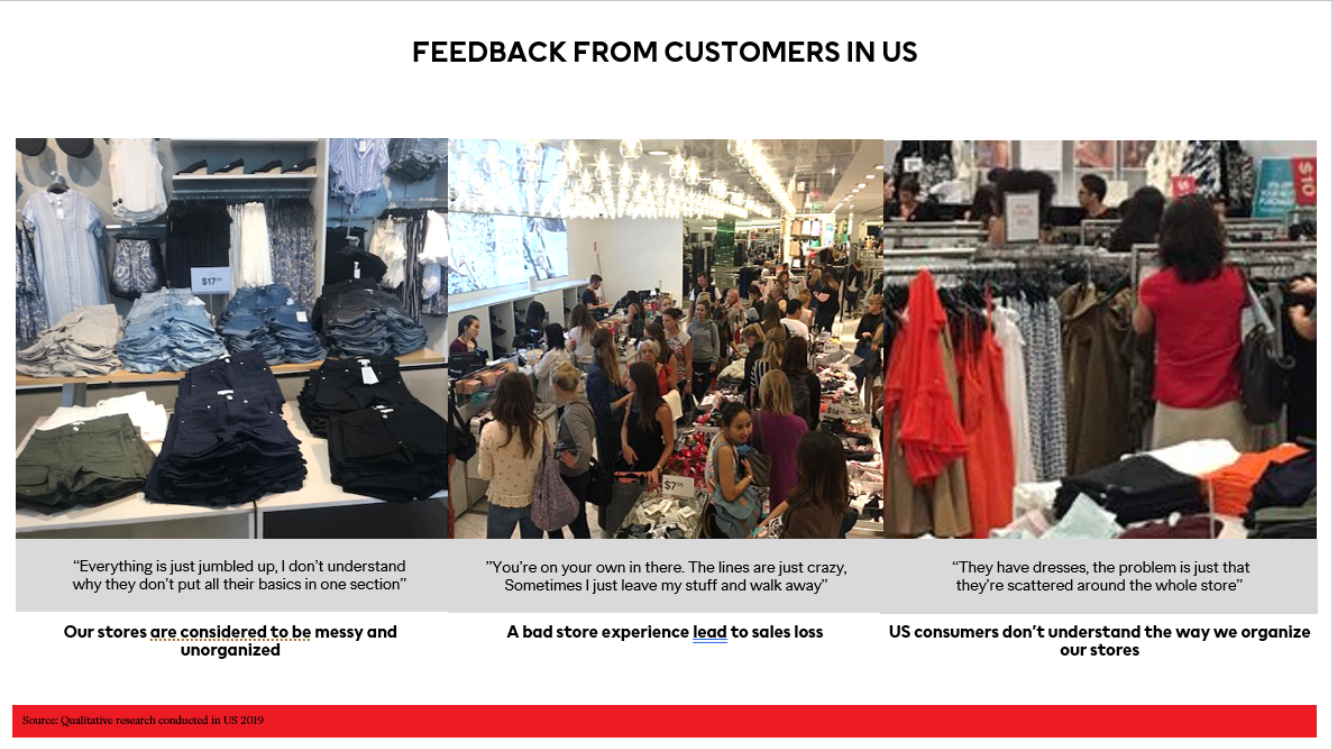
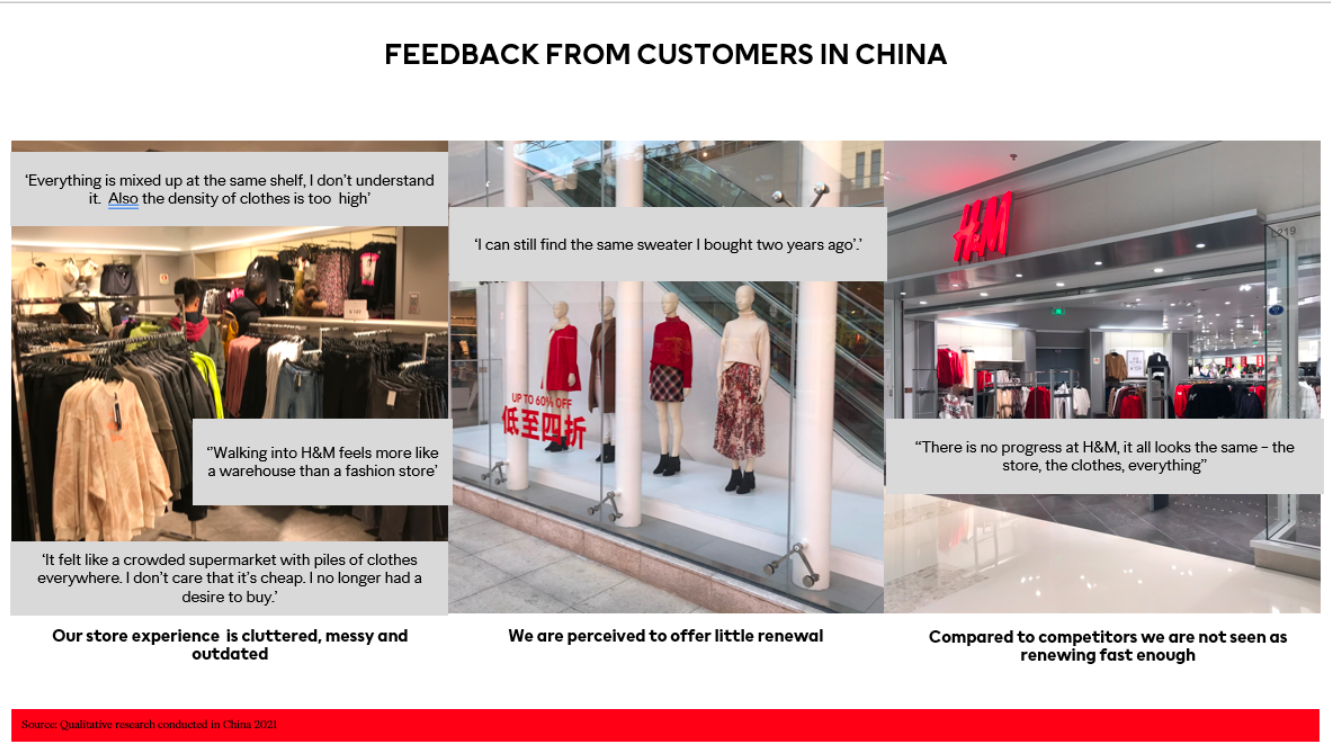
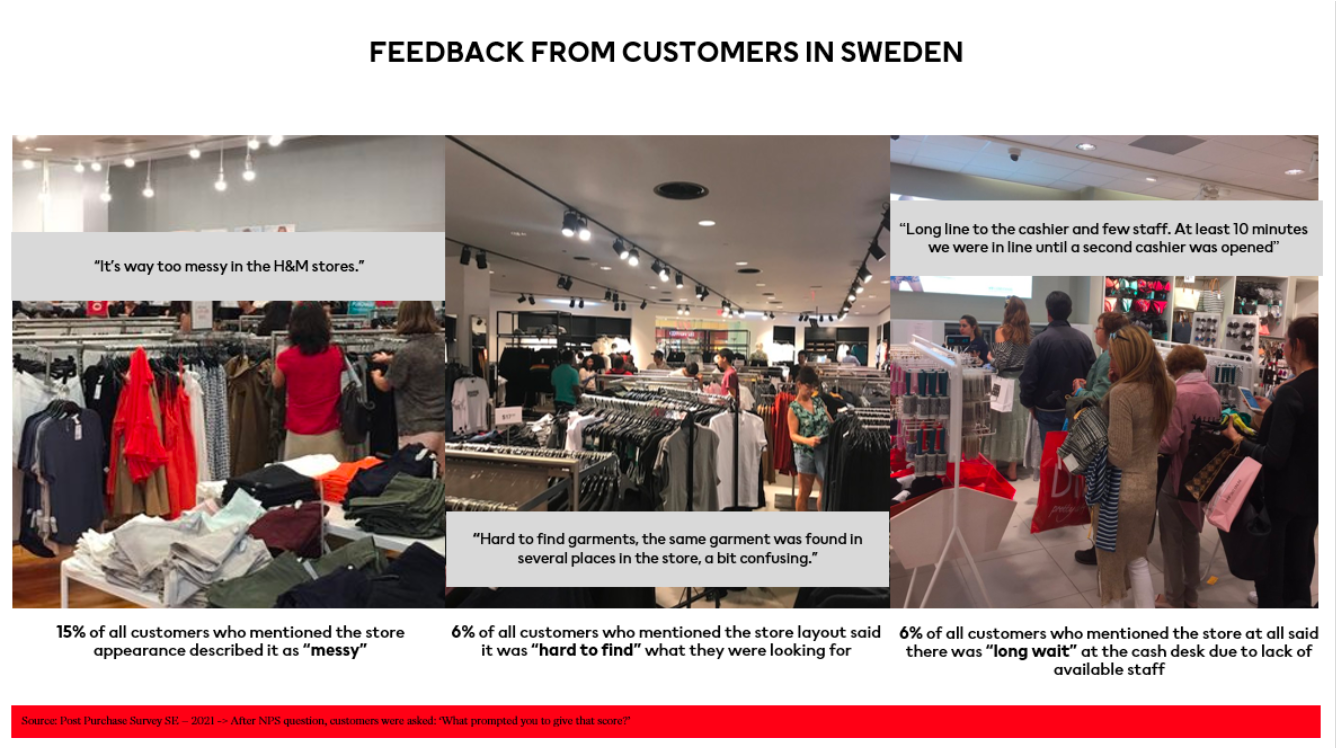
Research across the US, China, and Sweden confirmed the bet was right. In Sweden, 15% of customers who mentioned the store described it as "messy," and 6% said products were hard to find. In China, feedback was harsher: stores were described as feeling more like a warehouse than a fashion store. But the deeper issue, surfaced through staff interviews, was that the in-store inventory system itself only updated once or twice a day. Any navigation feature built on top of stale data would confidently point customers toward stock that might already be gone.
“It feels more like a warehouse than a fashion store.”
Customer research, China
03
Research and insights
I led customer research across the US, China, and Sweden, interviewing both customers and store staff. That research is what surfaced the real root cause. Staff didn't describe the map as the missing piece; they described the inventory system itself as outdated. That reframing, from "customers need a map" to "the underlying data needs to be real-time first," is what shaped the final solution.
04
Exploring the options
Three approaches were piloted in real stores, each addressing a piece of the problem, with limited time to ship something that fixed the root cause rather than adding a nicer interface on top of the same outdated system:
- RFID tags for product tracking.
- Smart cameras for shelf monitoring.
- Autonomous store bots that could scan aisles and assist customers.
Key decision · Fix the data, not just the interface
- The tension
- The obvious move was to build the map and ship it; customers had been asking for exactly that. But a map is only as good as the data behind it, and an inventory system updating once or twice daily meant the map would inherit that staleness.
- What I decided
- I made the call to pair the map with store bots that physically scanned shelves to keep inventory current in real time, treating real-time accuracy as a precondition for the map being trustworthy, not a nice-to-have layered on afterward. RFID was scoped for a later phase.
- The result
- The map launched on data customers could actually trust, which is what made the location and conversion gains real rather than cosmetic.
05
Connecting the online journey to the physical store
The obvious framing was "help people find a product in the store." I reframed it: the real problem was a broken handoff, where customers built intent online, then lost that context at the door. So rather than start at the map (the visible symptom), I worked the journey in order, surfacing availability upstream, making intent explicit, making the assortment store-specific, and only then handing off to in-store wayfinding.
The insight that governed everything: fix the data, not just the interface.
The inventory system refreshed once or twice a day, and a map pointing at stock that isn't there is worse than no map at all. Real-time accuracy became a precondition, so every surface below sits on shelf-level data, which is what most wayfinding concepts quietly skip.
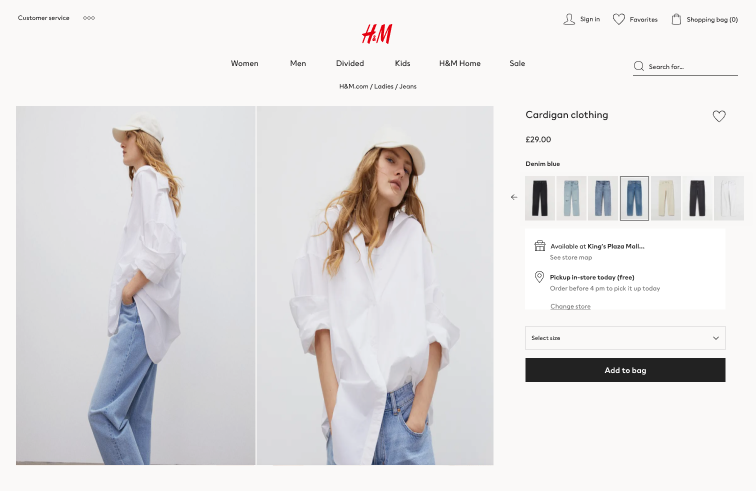
Store availability, moved upstream
Customers had no way to know if an item was available nearby before making the trip, so the physical store stayed invisible until they were standing in it.
The design call: I surfaced store availability and pickup information at the point of purchase, bringing the physical store into the digital journey without disrupting the existing e-commerce flow.
Signal: A wasted trip is the most expensive failure in the journey: it costs the customer time and it teaches them not to trust the store option again. Placing availability at the decision point is where it changes behaviour.
What I ruled out: A separate 'store mode' section. It hid availability behind a deliberate detour, so only customers who already trusted the feature would find it. The point was to reach the ones who didn't.
Shopping intent, made explicit
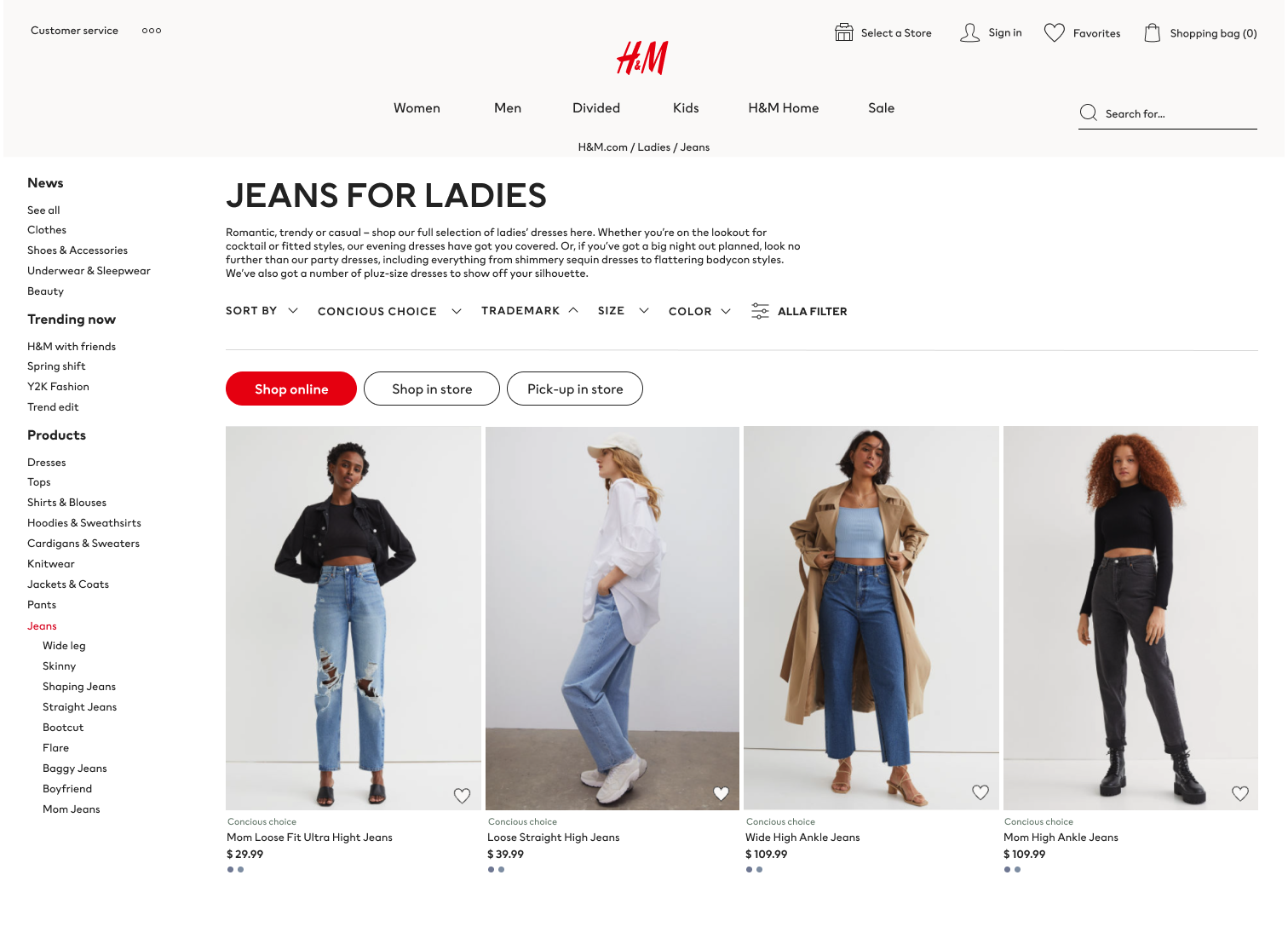
A single assortment had to serve two very different intents, buying for delivery versus planning a store visit, and it served neither well.
The design call: At category level, customers can switch between Shop online, Shop in store, and Pick-up in store, so the assortment adapts to intent early in the journey.
A location-aware assortment
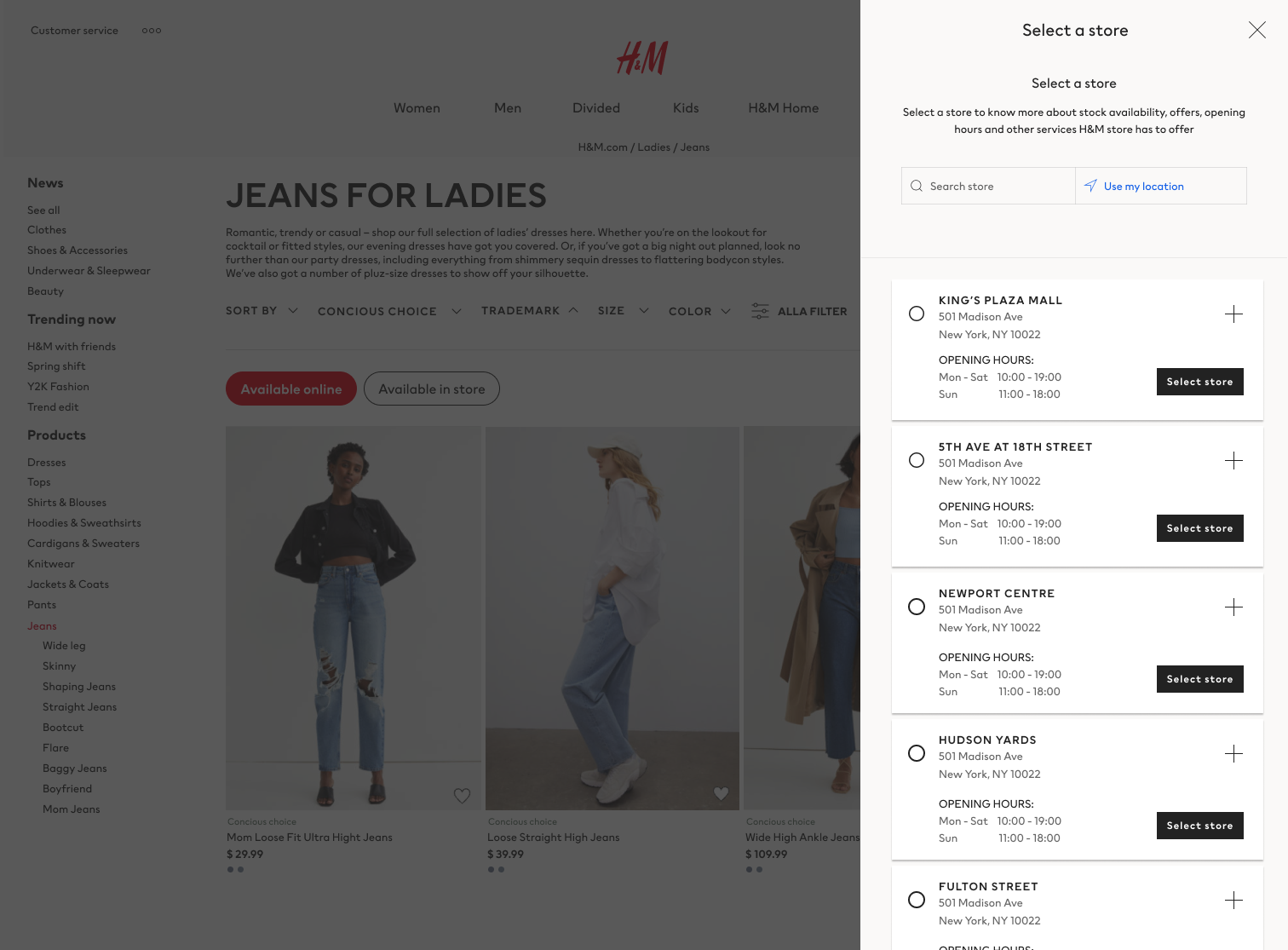
Online expectation and physical availability were disconnected: what you found online might simply not be in the store you'd travel to.
The design call: Once a store is selected, the experience becomes location-aware, showing products available in that specific store and reinforcing the selected location throughout the journey.
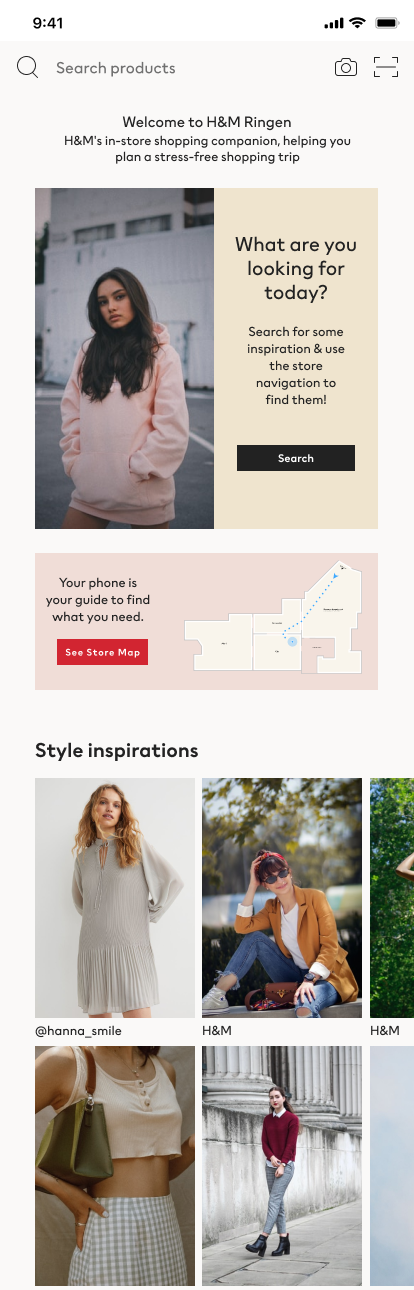
From e-commerce to wayfinding
Inside a large store, a standard shopping app is the wrong tool; the job shifts from browsing to navigating a physical space.
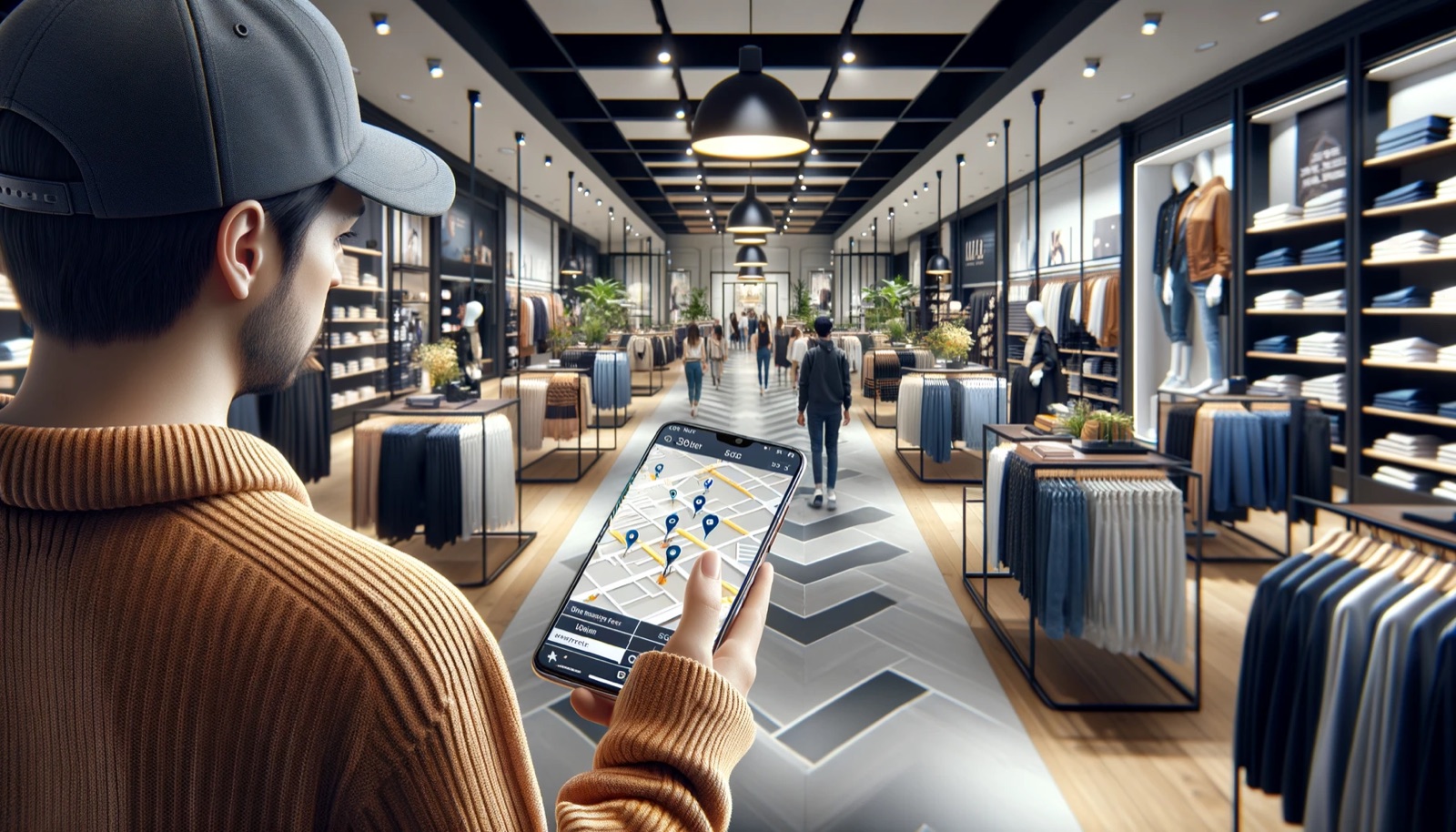
The design call: The mobile experience becomes an in-store companion: customers can search for products, open the store map, and discover inspiration while they shop, bridging digital discovery and physical reality.
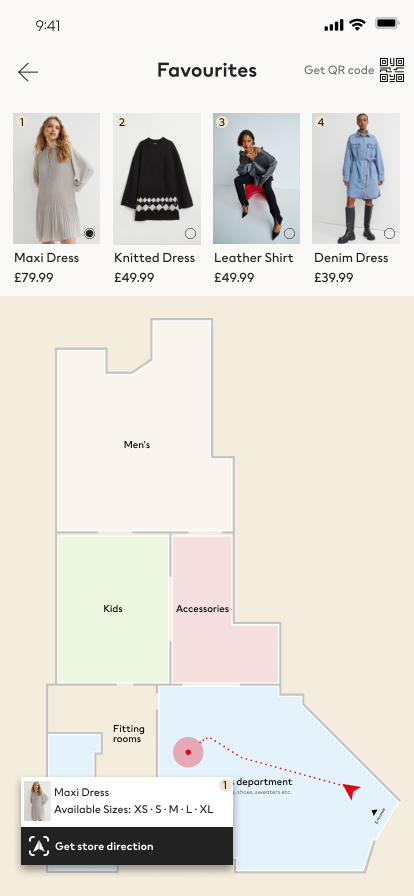
Saved products become routes
Customers were left to interpret department names and signage themselves, which is exactly where in-store shopping broke down.
The design call: From favourites or a saved product, customers see where an item is located and start navigation directly from the product card, turning intent into an actionable route.
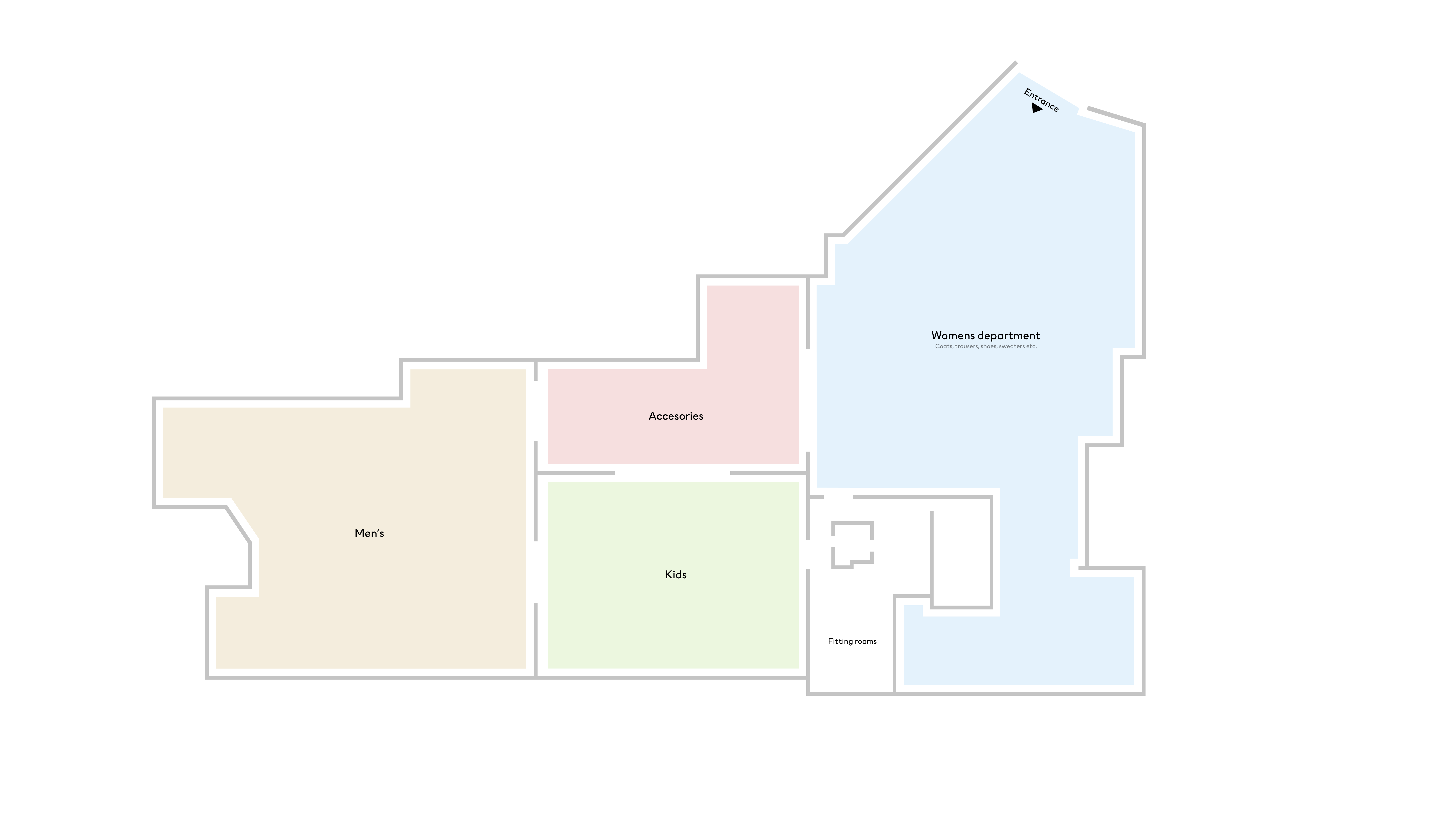
The store map behind it all
Product-level wayfinding needs a spatial model of the store, departments, fitting rooms, accessories, entrances, that simply didn't exist digitally.
The design call: The store map translates the physical layout into a simple digital structure, creating the spatial layer that connects product information to real-world departments and customer movement.
Signal: This is where the data strategy and the interface meet: the map is only trustworthy because it sits on top of real-time, shelf-level inventory. Without that foundation, precise wayfinding would just point confidently at the wrong place.
06
Three concepts, three ways in
Before committing to one model, I prototyped three MVP concepts, each testing a different way a customer might start the "find it in store" journey: searching for it, saving it, or being routed to it fastest. Testing the entry point as competing concepts is how I de-risked the navigation model before build.
Concept 1 · New Search
Leads with search: the companion opens on a search bar and inspiration prompt, with the store map one tap away. It tested whether customers would treat the app as a product-finder first and let search, not the map, carry navigation.
Concept 2 · Favourite List
Starts from intent already expressed: saved favourites become the entry point, turning a product the customer chose online into an in-store location and route. It tested whether continuity beat searching from scratch on arrival.
Concept 3 · Time Saver
Optimises for speed, framing the whole flow around reaching the right product in the fewest steps. It tested how much customers valued a lean, task-focused path over browsing, and where “helpful companion” tips into “just get me there.”
07
What shipped, tied to outcome
- Store bots scanning shelves in real time, which drove the 15% inventory accuracy increase within the first two months, directly solving the staleness problem staff had flagged.
- An interactive map built on that now-accurate data, which drove the roughly 12% increase in cart conversion on located products and a 25% reduction in overall product search time.
- A/B testing and painted-door tests post-launch, which validated real usage patterns and surfaced further refinements.
- Experimentation metrics and decision frameworks built alongside it, which cut pilot-to-deployment time by 40%, letting the team assess and scale high-potential retail concepts faster.
Result and impact
Bridging online browsing with in-store reality
Improved Inventory Accuracy by
Improved Cart Conversion by
Reduced Search Time by
* Results measured across targeted pilot stores.
How we measured success
The headline numbers were only trustworthy because success was defined before launch and measured across several dimensions, not a single vanity metric.
Inventory accuracy
A 15% increase in inventory identification accuracy within the first two months, the clearest proof the real-time data foundation was holding up.
Customer satisfaction
Surveys, NPS, and direct feedback showed a positive shift, reflecting genuine relief at being able to find products in store.
Sale of located products
A roughly 12% increase in cart conversion on products found through Locate in Store, evidence the system was actively guiding customers to purchase.
Customer engagement
Higher app usage and interaction with in-store technology for locating products, showing the companion earned a place in the shopping trip.
08
Next steps
Shipping the pilot was the start, not the finish. Three threads carried the work forward.
Addressing the risks and challenges
The impact on online orders and the balance between digital and physical experiences were real risks. Rather than pretend they were solved at launch, I kept them live through regular team and stakeholder discussions, treating them as ongoing tensions to manage.
Analysing data for continuous improvement
Refining "My H&M Store" ran on A/B testing and painted-door tests, not just to validate the feature but to keep improving it. Reading that data let the team observe real behaviour, spot patterns, and find the areas that needed sharpening.
Long-term vision: beyond the initial success
The intent was a system that keeps evolving with changing consumer needs, integrating further services and features so the omnichannel experience compounds over time rather than plateauing after launch.
Conclusion
Locate in Store is evidence of what a deliberately planned UX strategy can do: pairing customer insight with the right technology to reshape the retail experience around personalisation, efficiency, and ease. As the UX Strategist, my role was the connective tissue, tying the technology to what customers actually needed so every part of the project held together as one coherent experience rather than a set of features.
Want to talk through this kind of work? Get in touch.
More work